> ## Documentation Index
> Fetch the complete documentation index at: https://docs.together.ai/llms.txt
> Use this file to discover all available pages before exploring further.
# Upload a LoRA adapter
> Serve a custom LoRA adapter uploaded from Hugging Face or S3.
export const ConsoleButton = ({href, children}) => {
return
{children}
;
};
Run inference on your own [low-rank adapter (LoRA)](/docs/fine-tuning/lora-vs-full) by uploading it to Together AI and deploying it for [dedicated model inference](/docs/dedicated-endpoints/overview). You can import adapters from Hugging Face Hub or upload them from an S3 archive, including adapters you trained outside of Together AI.
To upload a full fine-tuned model instead of an adapter, see [Upload a fine-tuned model](/docs/dedicated-endpoints/custom-models).
## Requirements
An adapter is eligible for upload if it meets these requirements:
* **Source:** Hugging Face Hub or an S3 presigned URL.
* **Files:** The adapter directory must contain `adapter_config.json` and `adapter_model.safetensors`.
* **Base model:** The adapter must target a base model that Together AI supports for dedicated inference.
If you're uploading from S3, you must package the adapter files in a single archive (`.zip` or `.tar.gz`) with the files at the root of the archive, not nested inside an extra top-level directory. The presigned URL must point to the archive and have an expiration of at least 100 minutes.
## Create the adapter
Register the adapter in your project before you upload weights. Every adapter must reference a [supported base model](/docs/dedicated-endpoints/models) via `baseModelId`.
Give the adapter a readable name (for example `my-stsb-lora`), rather than a Hugging Face repo ID.
If you pass an org-prefixed name like `predibase/glue_stsb`, the prefix will be stored on top of your project slug, and the catalog will render a doubled slug (for example `your-project/predibase/glue_stsb`).
Strip the org and pass only the bare repo name. An adapter that already has a doubled name can't be renamed, so the only fix is to delete it and re-upload under the correct name.
List [supported models](/docs/dedicated-endpoints/models#list-supported-models-programmatically) and copy the `id` of the architecture the adapter targets (for example `ml_CbJNwQC2ZqCU2iFT3mrCh`).
```bash CLI theme={null}
tg beta models create my-stsb-lora \
--type adapter \
--base-model ml_CbJNwQC2ZqCU2iFT3mrCh
```
```python Python theme={null}
from together import Together
client = Together()
project_id = client.whoami().project_id
adapter = client.beta.models.create(
project_id=project_id,
type="adapter",
name="my-stsb-lora",
base_model_id="ml_CbJNwQC2ZqCU2iFT3mrCh",
)
print(adapter)
```
```typescript TypeScript theme={null}
import Together from 'together-ai';
const client = new Together();
const { project_id: projectId } = await client.whoami();
const adapter = await client.beta.models.create({
projectId,
type: 'adapter',
name: 'my-stsb-lora',
baseModelId: 'ml_CbJNwQC2ZqCU2iFT3mrCh',
});
console.log(adapter);
```
Save the returned model `id` (for example `ml_abc123`). You pass this value to the upload command in the next step. The `--type adapter` you set on create marks the record as a LoRA adapter, so the upload commands derive the type from the record and take no type flag.
### Create request fields
| Field | Required | Description |
| - | - | - |
| `name` | Yes | Inference-addressable name for the uploaded adapter. |
| `base_model_id` | Yes | `id` of the supported base model the adapter targets. |
| `description` | No | Description shown in your project catalog. |
## Upload the adapter
After creating the adapter record, upload its weights. Use a local upload when the files are on your machine, or a remote upload to stream them from Hugging Face or a presigned S3 URL. The adapter's type and base model come from the record you created, so you don't pass them again here.
### Upload from your machine
Point the CLI at your local adapter directory:
```bash CLI theme={null}
tg beta models upload ml_abc123 ./path/to/adapter-dir
```
### Upload from Hugging Face or S3
A remote upload streams the weights server-side. Pass the source URL as `--from` (use `--token` for gated or private Hugging Face repos). For S3, pass the presigned archive URL as `--from` (no token needed):
```bash CLI theme={null}
tg beta models remote-uploads create ml_abc123 \
--from https://huggingface.co/your-org/your-adapter \
--token hf_your_token
```
```python Python theme={null}
from together import Together
client = Together()
project_id = client.whoami().project_id
job = client.beta.models.remote_uploads.create(
project_id=project_id,
model_id="ml_abc123",
remote_url="https://huggingface.co/your-org/your-adapter",
token="hf_your_token",
)
print(job)
```
```typescript TypeScript theme={null}
import Together from 'together-ai';
const client = new Together();
const { project_id: projectId } = await client.whoami();
const job = await client.beta.models.remoteUploads.create({
projectId,
modelId: 'ml_abc123',
remoteUrl: 'https://huggingface.co/your-org/your-adapter',
token: 'hf_your_token',
});
console.log(job);
```
The response is the upload job object, with `id`, `modelId`, and `status` at the top level. Save the job `id`. You use it to poll for status.
### Upload from the console
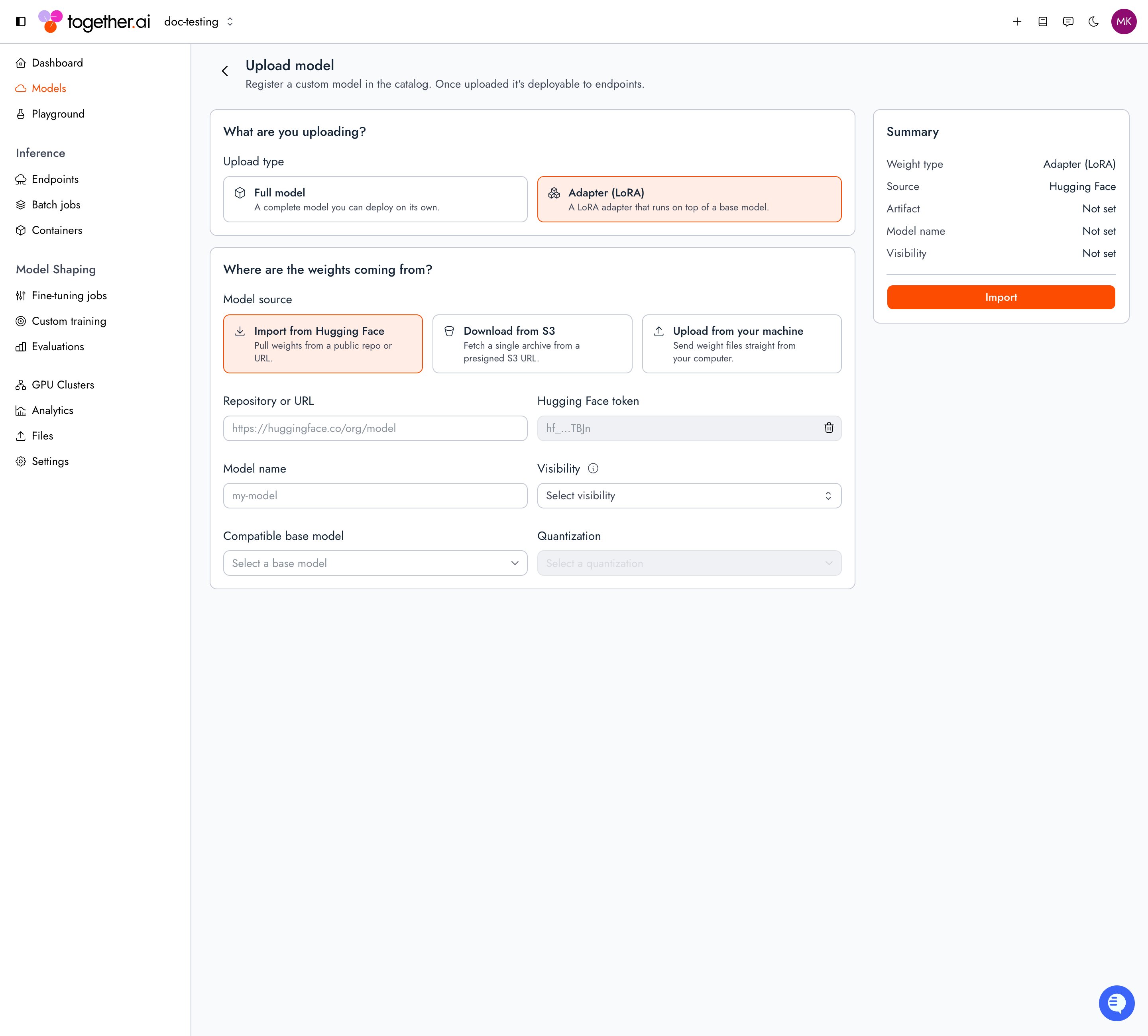
The console combines creating the adapter record and uploading its weights into a single form.
Upload a model
Set **Upload type** to **Adapter (LoRA)**.
Under **Model source**, select **Import from Hugging Face** and enter the repo path or URL (add a **Hugging Face token** for gated or private repos), or select **Download from S3** and paste a presigned archive URL. **Upload from your machine** shows a CLI command instead, so use `tg beta models upload` for files on your machine.
Enter a **Model name**, choose a **Visibility**, and select the **Compatible base model** the adapter runs on top of.
Select **Import**. The upload runs server-side, with progress shown below the form. You can leave the form: the adapter appears under **My models** with an **Uploading** badge while the job is pending or running.
## Check upload status
Poll the remote-upload job until `status` is `REMOTE_UPLOAD_STATUS_SUCCEEDED`. The adapter is ready to deploy at that point.
```bash CLI theme={null}
# One upload job
tg beta models remote-uploads retrieve job_abc123
# All upload jobs in the project
tg beta models remote-uploads list
```
```python Python theme={null}
from together import Together
client = Together()
project_id = client.whoami().project_id
# One upload job
job = client.beta.models.remote_uploads.retrieve(
"job_abc123",
project_id=project_id,
)
print(job.status)
# All upload jobs in the project
jobs = client.beta.models.remote_uploads.list(project_id=project_id)
print(jobs)
```
```typescript TypeScript theme={null}
import Together from 'together-ai';
const client = new Together();
const { project_id: projectId } = await client.whoami();
// One upload job
const job = await client.beta.models.remoteUploads.retrieve('job_abc123', {
projectId,
});
console.log(job.status);
// All upload jobs in the project
const jobs = await client.beta.models.remoteUploads.list({ projectId });
console.log(jobs);
```
Once the job reaches `REMOTE_UPLOAD_STATUS_SUCCEEDED`, confirm the files landed:
```bash CLI theme={null}
tg beta models ls-files ml_abc123
```
My models
You can also track uploads on the **My models** page in the console. While a remote upload is pending or running, the adapter floats to the top of **My models** with an **Uploading** badge. Open the adapter to watch the live **Upload progress** event log on the model detail page. The revisions table appears after the upload finishes. That list also includes Internal-visibility adapters from other projects in your organization. Use the **Visibility** filter to show only **Internal** or only **Private** adapters.
## Check revision validation
After files land, Together validates the revision's weights automatically. Validation checks that the weights are in safetensors format and that the adapter is compatible with its base model. A revision must reach `REVISION_VALIDATION_STATUS_SUCCESS` before you can deploy it when you pin that revision explicitly.
List revisions for an adapter:
```bash CLI theme={null}
tg beta models ls-revisions ml_abc123
```
The list and retrieve revision APIs also return validation fields on each revision. Replace `$PROJECT_ID` with your project ID (`proj_...`):
```bash Shell theme={null}
# All revisions
curl -s -H "Authorization: Bearer $TOGETHER_API_KEY" \
"https://api.together.ai/v2/projects/$PROJECT_ID/models/ml_abc123/revisions"
# One revision
curl -s -H "Authorization: Bearer $TOGETHER_API_KEY" \
"https://api.together.ai/v2/projects/$PROJECT_ID/models/ml_abc123/revisions/rv_abc123"
```
Each revision in the response includes:
```json theme={null}
{
"data": [
{
"revisionId": "rv_abc123",
"createdAt": "2026-07-02T20:05:00Z",
"validationStatus": "REVISION_VALIDATION_STATUS_SUCCESS",
"lastValidatedAt": "2026-07-02T20:06:00Z",
"validationErrors": []
}
],
"object": "list"
}
```
### Revision validation fields
| Field | Description |
| - | - |
| `validationStatus` | Validation state for this revision. See the table below. |
| `lastValidatedAt` | When validation last ran for this revision. Omitted until validation has started. |
| `validationErrors` | Errors from the last validation run. Empty when validation succeeded or is still pending. |
### `validationStatus` values
| Value | Meaning |
| - | - |
| `REVISION_VALIDATION_STATUS_PENDING` | Validation is queued or running. Poll until the status changes. |
| `REVISION_VALIDATION_STATUS_SUCCESS` | Weights validated successfully. The revision is ready to deploy. |
| `REVISION_VALIDATION_STATUS_FAILED` | Validation failed. Read `validationErrors` for the cause. |
| `REVISION_VALIDATION_STATUS_ERROR` | Validation could not complete due to an internal error. Retry later or contact support. |
| `REVISION_VALIDATION_STATUS_UNSPECIFIED` | Validation has not started yet. |
When validation fails, each entry in `validationErrors` includes `rule`, `severity`, and `message` describing what went wrong.
## Deploy the adapter
Once the upload completes, your adapter has a model ID (`ml_...`) in your project, linked to its base model. Deploy it the same way as a base model, using a [config](/docs/dedicated-endpoints/configs) for its base model. The CLI's `deploy` command creates the endpoint, attaches a deployment, and routes all traffic to it in one step. The SDK has no single equivalent, so the Python and TypeScript samples run the same steps individually:
```bash CLI theme={null}
tg beta endpoints deploy ml_abc123 \
--endpoint my-adapter \
--config cr_CbzGdmn14t3HYrXXitmKa
```
```python Python theme={null}
from together import Together
client = Together()
project_id = client.whoami().project_id
model = f"projects/{project_id}/models/ml_abc123"
config = f"projects/{project_id}/configs/cr_CbzGdmn14t3HYrXXitmKa"
# 1. Create the endpoint.
endpoint = client.beta.endpoints.create(
project_id=project_id,
name="my-adapter",
)
# 2. Create a deployment bound to your adapter and config.
deployment = client.beta.endpoints.deployments.create(
endpoint.id,
project_id=project_id,
name="prod",
model=model,
config=config,
autoscaling={"min_replicas": 1, "max_replicas": 1},
)
# 3. Route 100% of traffic to the deployment.
client.beta.endpoints.update(
endpoint.id,
project_id=project_id,
traffic_split=[{"deployment_id": deployment.id, "weight": 1}],
)
print(endpoint.name)
```
```typescript TypeScript theme={null}
import Together from 'together-ai';
const client = new Together();
const { project_id: projectId } = await client.whoami();
const model = `projects/${projectId}/models/ml_abc123`;
const config = `projects/${projectId}/configs/cr_CbzGdmn14t3HYrXXitmKa`;
// 1. Create the endpoint.
const endpoint = await client.beta.endpoints.create({
projectId,
name: 'my-adapter',
});
// 2. Create a deployment bound to your adapter and config.
const deployment = await client.beta.endpoints.deployments.create(
endpoint.id,
{
projectId,
name: 'prod',
model,
config,
autoscaling: { minReplicas: 1, maxReplicas: 1 },
},
);
// 3. Route 100% of traffic to the deployment.
await client.beta.endpoints.update(endpoint.id, {
projectId,
trafficSplit: [{ deploymentId: deployment.id, weight: 1 }],
});
console.log(endpoint.name);
```
See [Manage deployments](/docs/dedicated-endpoints/manage) for the full deployment lifecycle.
## Run inference
Once the deployment is `READY` and routable, call the endpoint by its endpoint string (`/`), the same as any other dedicated endpoint. Dedicated model inference is served at `https://api-inference.together.ai`:
```bash cURL theme={null}
curl -s -X POST https://api-inference.together.ai/v1/chat/completions \
-H "Authorization: Bearer $TOGETHER_API_KEY" \
-H "Content-Type: application/json" \
-d '{
"model": "your-project-slug/my-adapter",
"messages": [{"role": "user", "content": "What is the capital of France?"}],
"max_tokens": 128
}' | jq .
```
```python Python theme={null}
from together import Together
client = Together(base_url="https://api-inference.together.ai/v1")
response = client.chat.completions.create(
model="your-project-slug/my-adapter",
messages=[{"role": "user", "content": "What is the capital of France?"}],
max_tokens=128,
)
print(response.choices[0].message.content)
```
```typescript TypeScript theme={null}
import Together from 'together-ai';
const client = new Together({
baseURL: 'https://api-inference.together.ai/v1',
});
const response = await client.chat.completions.create({
model: 'your-project-slug/my-adapter',
messages: [{ role: 'user', content: 'What is the capital of France?' }],
max_tokens: 128,
});
console.log(response.choices[0].message.content);
```
## Troubleshooting
**"Model not found" during upload:** Create the adapter record first with `tg beta models create --type adapter`, and pass the returned `id` to the upload command.
**"Model name already exists":** Each uploaded adapter needs a unique name. Adapter versioning isn't supported, so re-upload under a new name.
**Missing required files:** The adapter source must contain both `adapter_config.json` and `adapter_model.safetensors`. Confirm both are present at the root of the archive (S3) or in the **Files and versions** tab on Hugging Face.
**Base model incompatibility:** The adapter must target a base model that Together AI supports for dedicated inference. Verify the base model you trained against is available for [dedicated model inference](/docs/dedicated-endpoints/models).
**Upload job stuck in `Processing`:** Most often this means the source can't be reached. For S3, confirm the presigned URL hasn't expired. For Hugging Face, confirm your token has access to the repo.
**`401` or `403` during upload:** Check that `TOGETHER_API_KEY` is set, your Hugging Face token has permission for private repos, and your S3 presigned URL is valid and not expired.
**Adapter delete fails with `the model is referenced by a live deployment` (HTTP 400):** A deployment still references this adapter. [Stop the deployment](/docs/dedicated-endpoints/manage#stop-a-deployment), wait for `DEPLOYMENT_STATE_STOPPED`, [delete the deployment](/docs/dedicated-endpoints/manage#delete-resources), then delete the adapter with `tg beta models delete `.
This documentation is built and hosted on [Mintlify](https://mintlify.com), a developer documentation platform.
 ## Check upload status
Poll the remote-upload job until `status` is `REMOTE_UPLOAD_STATUS_SUCCEEDED`. The adapter is ready to deploy at that point.
## Check upload status
Poll the remote-upload job until `status` is `REMOTE_UPLOAD_STATUS_SUCCEEDED`. The adapter is ready to deploy at that point.