

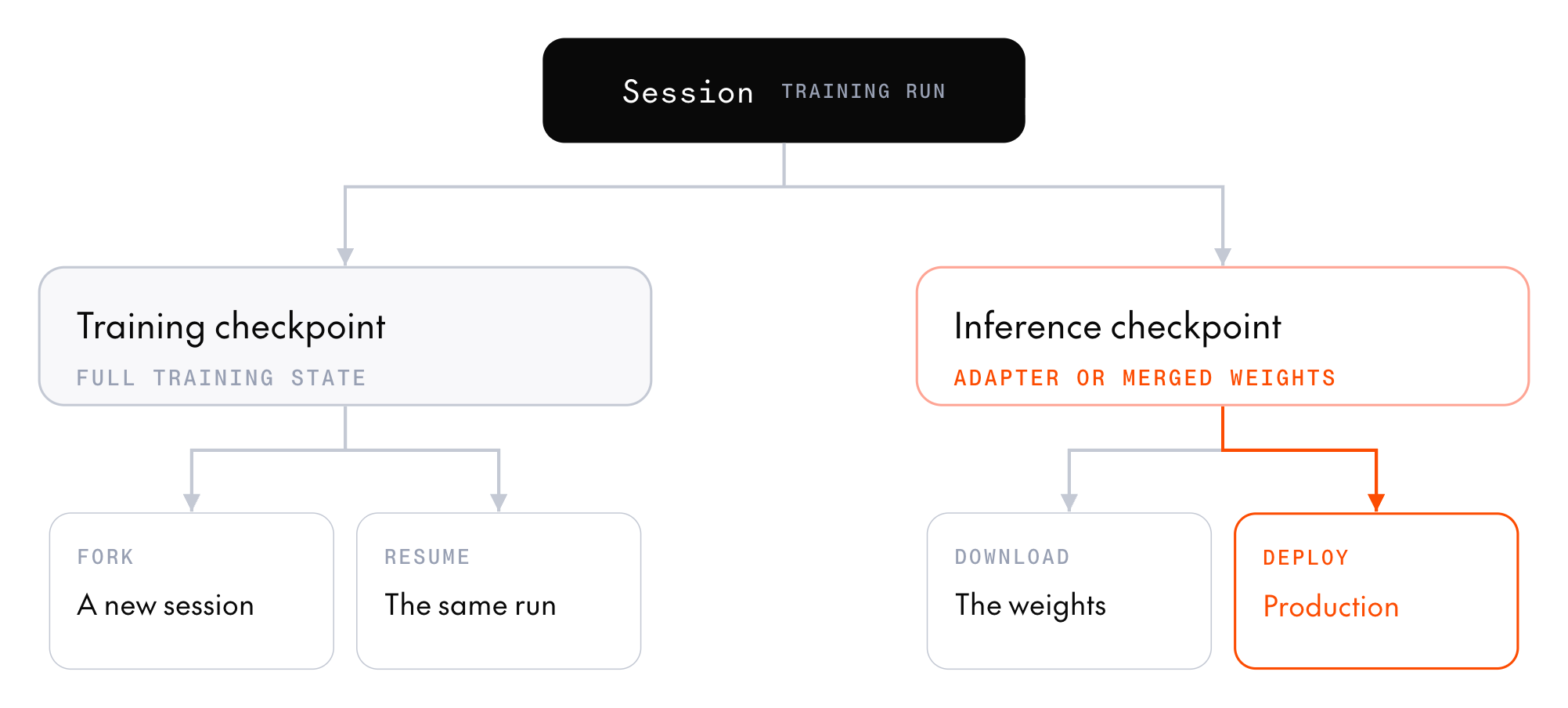
- An inference checkpoint snapshots the model weights, ready to download. For most models, it also registers them in the model registry so you can deploy them.
- A training checkpoint saves the full training state so a later session can resume or fork the run.
Inference checkpoints
Cookbook recipes save an inference checkpoint at the final step, and everyinference_checkpoint_interval steps if you set it. To save one from the SDK, call create_inference_checkpoint:
InferenceCheckpoint with an id, the step it was saved at, and a registration that holds its model registry IDs. The session also lists the checkpoint in inference_checkpoints.
A checkpoint from a low-rank adapter (LoRA) session registers the adapter in registration.adapter. A checkpoint from a full-weight session, or from a LoRA session on custom base weights, registers a merged full model in registration.model instead. Each holds a model registry id (ml_...) and a revision_id (rv_...), which you use to deploy the checkpoint.
A checkpoint that wasn’t uploaded to the model registry has no registration, so it can’t be deployed. Checkpoints on models marked Not registered in Supported models aren’t uploaded, because dedicated model inference can’t serve their adapters. Download them instead.
Download the weights
To download an inference checkpoint’s files to a local directory, calldownload_checkpoint with the checkpoint’s id. Training checkpoints can’t be downloaded, only resumed or forked.
Pass variant to choose which files you get:
CHECKPOINT_VARIANT_MERGED(the default): The base model with the adapter merged in, ready for any inference framework. Available for full-weight sessions, and for LoRA sessions on models that support it.CHECKPOINT_VARIANT_ADAPTER: The adapter weights alone, which are much smaller but need the base model alongside them for inference. On models marked Adapter only in Supported models, pass this variant.
CHECKPOINT_VARIANT_MERGED:
Qwen/Qwen3.8-27B-FP8, the model that dedicated model inference serves.
Training checkpoints
A training checkpoint saves the trained weights (the adapter, for a LoRA session), the optimizer state, and the step counter. To have a cookbook recipe save training checkpoints, settraining_checkpoint_interval on its config. The cookbook saves one only every training_checkpoint_interval steps, never automatically at the final step. To get one at the end of the run, set the interval equal to the step count. The cookbook records the checkpoint IDs in runs/<run_name>/checkpoints.jsonl.
To save a training checkpoint from the SDK, call create_training_checkpoint:
Resume or fork a run
To start a session from a training checkpoint, pass its ID asresume_from_checkpoint_id to resources.create_session, SessionClient.create, or any cookbook config. All of them also take load_optimizer, which applies only when you pass a checkpoint ID. It decides whether the new session continues the original run or starts a new one:
- Continue the same run: Omit
load_optimizeror passTrue. The new session restores the adapter, the optimizer state, and the step counter, and training continues where it left off. For a cookbook group relative policy optimization (GRPO) run, continue the run from its recipe to also pick up its data and learning-rate schedule where they stopped. - Start a new run from the weights: Pass
load_optimizer=False. The new session loads only the adapter weights, with a fresh optimizer and a step counter at zero. Use this to fork from a known-good state and try different hyperparameters, or to hand off from one training method to another, such as from supervised fine-tuning (SFT) to GRPO.
- LoRA settings: Pass the same
lora_config(rank and alpha) the original session used. The session doesn’t inherit LoRA settings from the checkpoint, so if you omitrank,alpha, ordropout, the server applies its defaults. The exception istrain_unembed, which the session takes from the checkpoint when you omit it. The API rejects atrain_unembedvalue that differs from the checkpoint’s. - Base weights: The model resource must use the same base weights as the resource that saved the checkpoint. Catalog entries that share weights are interchangeable, so a checkpoint saved on
Qwen/Qwen3.8-27B-single-sessionresumes onQwen/Qwen3.8-27B. - Checkpoint type: On a resource with a trainer, LoRA sessions resume from training checkpoints only. To sample an inference checkpoint instead, start a session from it on a sampling-only resource.
Find a checkpoint
To look up checkpoints after a session ends, callclient.post_training.checkpoints.list. It returns your project’s training and inference checkpoints, newest first. Pass session_id, base_model, or type to filter them.
For example, to recover a training checkpoint ID when you no longer have the run directory’s checkpoints.jsonl, list the session’s training checkpoints:
type to get both kinds, or pass CHECKPOINT_TYPE_INFERENCE to get only inference checkpoints.
Each call returns one page of at most limit checkpoints (1 to 100). When page.meta.has_more is true, pass page.meta.next_cursor as after to get the next page.
A listed inference checkpoint holds its model registry IDs in inference_registration.adapter or inference_registration.model. A listed training checkpoint keeps them in training_registration, which holds the training state and can’t be deployed. To resume, pass the checkpoint’s id, not these registry IDs.
To get one checkpoint’s details, call client.post_training.checkpoints.retrieve("<checkpoint_id>"). Its lora_rank is the rank to pass in lora_config when you resume or fork a run from it. Checkpoints from full-weight sessions have no lora_rank.
Sample a saved checkpoint
A generator samples only from its own session’s current weights, so you can’t sample a saved checkpoint directly. Choose a route based on what you want to sample:- Training checkpoint: Start a session from it with
resume_from_checkpoint_idon a model resource that has a trainer and at least one generator replica. The service loads the checkpoint’s weights onto the generator when the session starts, sosession.generator.samplereturns completions from the saved model before you run any training step. - Inference checkpoint: Start a session from it on a sampling-only model resource. If it has a
registration, you can also deploy it to dedicated model inference and send requests to the deployment. - Base model: If serverless inference hosts the base model, call it there, the same way you check a baseline before training.
Sample an inference checkpoint
To sample an inference checkpoint without deploying it, start a session from it on a sampling-only resource, one created withnum_trainer_replicas=0. The checkpoint must belong to your project, and the resource must use the same base weights as the resource that saved the checkpoint.
The generators load the checkpoint’s weights when the session starts. Which weights they load depends on the resource’s training mode:
- LoRA resource: The session loads the checkpoint’s adapter and takes its LoRA settings from the checkpoint. The checkpoint must hold an adapter.
- Full-weight resource: The session loads the checkpoint’s full model weights. They must match the base model’s architecture and quantization, so an FP8 export doesn’t load onto a BF16 base model. A checkpoint that holds only an adapter can’t start a session here.
resume_from_checkpoint_id, and omit lora_config and load_optimizer:
Next steps
Deploy a checkpoint
Serve a trained model on dedicated model inference.
Combine methods
Hand a training checkpoint from one method to the next, such as SFT to GRPO.
Lifecycle, errors, and limits
Learn the timers and stops that can end a run, and how training checkpoints limit what you lose.
Start a training session
Look up every field a session takes when it resumes from a checkpoint.