

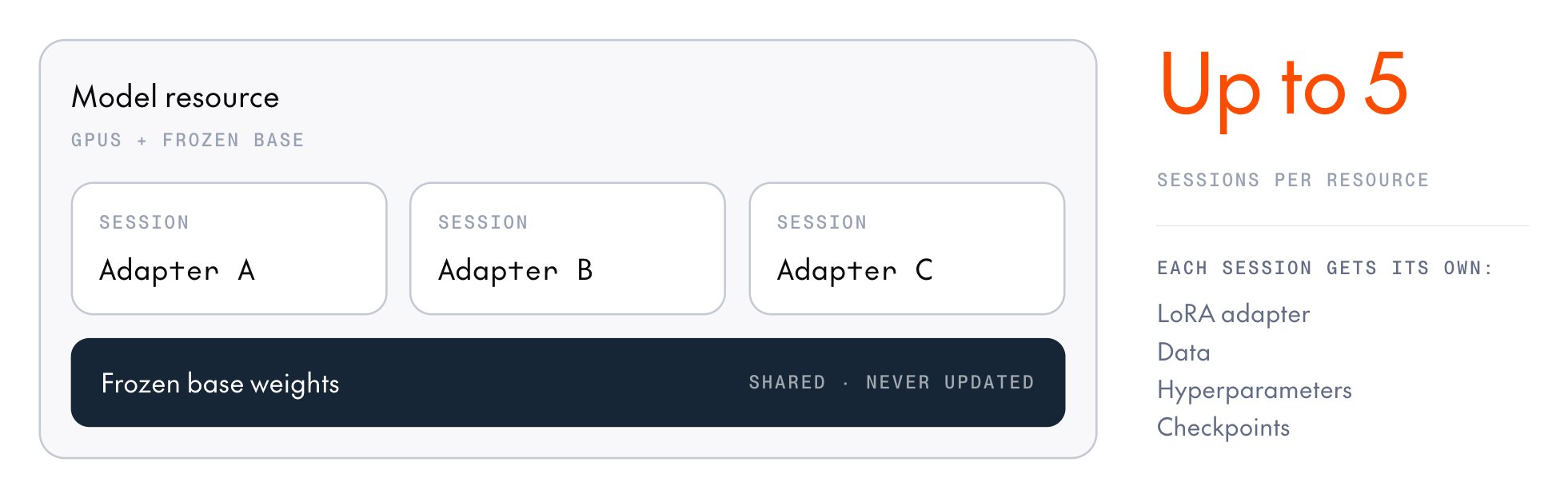
This page covers training several adapters on one model resource. You can then serve the trained adapters from one inference deployment and compare them.
Plan a sweep
A resource created withlora_enabled=True accepts up to five concurrent sessions by default, and fewer for some models, so check the model’s row on Supported models before you choose how many arms to run. A full-weight resource (lora_enabled=False) accepts one session. If you create a session beyond the cap, the API returns HTTP 429 with an “at capacity” message, and the SDK raises RateLimitError after a few retries.
Sessions on a resource share its base model, GPU type, generator replicas, and optimizer, so a sweep can vary only what each session sets for itself: its LoRA config, data, loss function, sampling settings, learning rate and other per-step optimizer parameters, and checkpoints.
The training method can vary by session too. A resource has no method of its own, and each session chooses its loss function per training step, so supervised fine-tuning (SFT), direct preference optimization (DPO), and group relative policy optimization (GRPO) sessions can run side by side. GRPO sessions sample completions, so they need a resource with at least one generator replica.
Train adapters with the SDK
Create one resource, then start a session on it for each adapter. To run the sessions concurrently, call the_async variants and await them together. This example trains three SFT arms, one per learning rate, on a shared trainer-only resource:
load_samples() with your own code that builds cross-entropy samples.
The finally block stops the resource even if an arm raises. It passes force=True because the API refuses a plain stop while another arm’s session is still active.
Each arm saves an inference checkpoint, so you can compare the three adapters on one deployment.
To add sessions to a resource that’s already running, such as one a teammate provisioned, attach to it instead of creating one.
Train adapters with the cookbook
The cookbook’s GRPO and SFT recipes accept amodel_resources_id, so several recipe runs can share one resource, whether it’s one you keep running or one that a sweep script provisions.
Attach to a running resource
A recipe’s config names exactly one model source:modelprovisions a fresh resource that the run owns. When the run exits, it stops both its session and the resource.model_resources_idattaches a session to an existing resource as a tenant. When the run exits, it stops only its own session and leaves the resource running.
model_resources_id to train on a resource that a teammate provisioned, or one you keep running across several experiments. To find a resource’s ID, list the ready resources or open the Model resources tab under Post-Training in the Together AI console. Then set model_resources_id and leave model unset:
- Be
READY. - Be LoRA-enabled when
use_lora=True. - Have a generator when the run samples.
recipes/grpo/deepmath_shared.py.
Run a sweep
To run a sweep with recipes, provision the resource once, run each arm’s recipe concurrently in its own session, and stop the resource once. The cookbook’s DeepMath sweep (recipes/grpo/deepmath_sweep.py) trains four GRPO arms this way, each with its own learning rate:
- Concurrency:
train_single_turnblocks, so each arm runs in its own thread. The SDK tracks each session’s work separately, so one arm’s teardown doesn’t cancel another arm’s work. - Isolation: An arm that raises doesn’t stop the others. Collect failures with
future.exception()after the pool drains. - Model selection: Put the arms in one
wandb_groupand compare theirval/accuracycurves side by side. Each arm already runs validation, so picking the best adapter takes no extra evaluation code. - Teardown: The
ModelResourcesClientcontext manager stops the resource once on exit, even if an arm raised. If you don’t use the context manager, callresource.stop()yourself.
uv run python recipes/grpo/deepmath_sweep.py.
Keep a resource alive
A resource stops on its own when it goes longer than its idle timeout (one hour by default) without an operation from any of its sessions. An attached session that sends no operations doesn’t keep the resource alive. When the resource stops, every session on it is markedEXPIRED.
To keep a shared resource alive between runs, start the next run within the idle timeout. For a longer gap, call extend_expiry on the resource’s handle.
A READY resource bills whether or not anything is training on it, so when your team is done, stop it with force=True, which also stops any tenant sessions still attached.
Next steps
Multi-LoRA deployment
Compare the trained adapters on one deployment and pick the winner.
Supported models
Check each model’s session cap and GPU types.
Manage model resources
Create, inspect, and stop the resource your sessions share.
Pricing
See what a shared resource costs and when it stops.