

How it works
The model resource, a set of Together AI GPUs with the base model loaded, does all the heavy computation required for training: generating completions, computing gradients, and updating the weights. Your training loop controls everything else: loading the data, choosing which prompts to train on, building each batch and setting its size, scoring the model’s outputs, and deciding when to stop. The loop is either a cookbook recipe or your own code built on the SDK. It runs on any machine with the Together SDK installed, including a laptop with no GPU.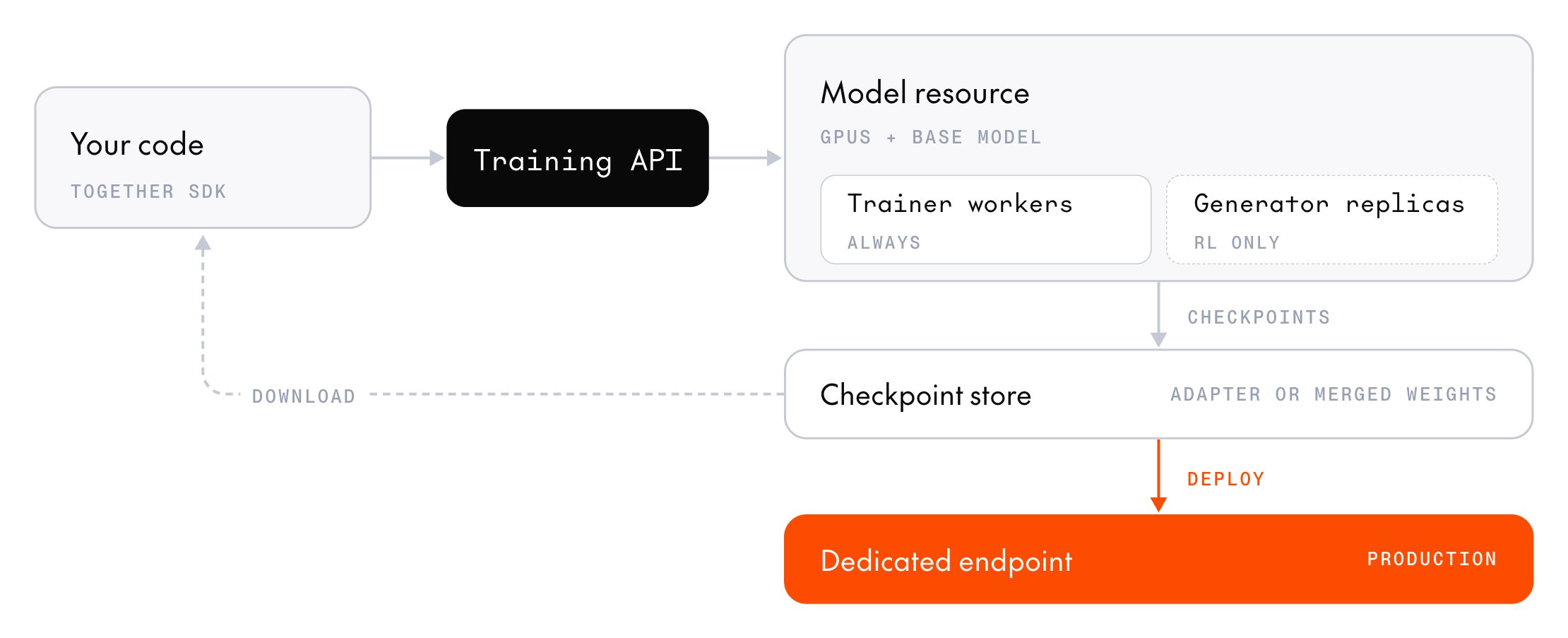
create) and attaching a training session to it (create_session). From then on, it calls the post-training API, which routes each operation to one of the model resource’s two roles: the trainer or, for reinforcement learning (RL), a generator replica. As it trains, the loop also saves checkpoints, which you can download or deploy.
For example, one step of an RL run looks like this:
- Your code sends a batch of prompts (
sample_batch), and the model resource generates several completions for each one. - Your code checks each completion against the known solution and scores it.
- Your code sends the scored completions back (
forward_backward), and the model resource computes gradients that push the model toward the higher-scoring completions. - The model resource updates the model’s weights (
optim_step). - The model resource publishes the new weights to its generator replicas (
weights_sync), so the next step generates completions from the updated model.
sample_batch or weights_sync call.
Model resources and sessions
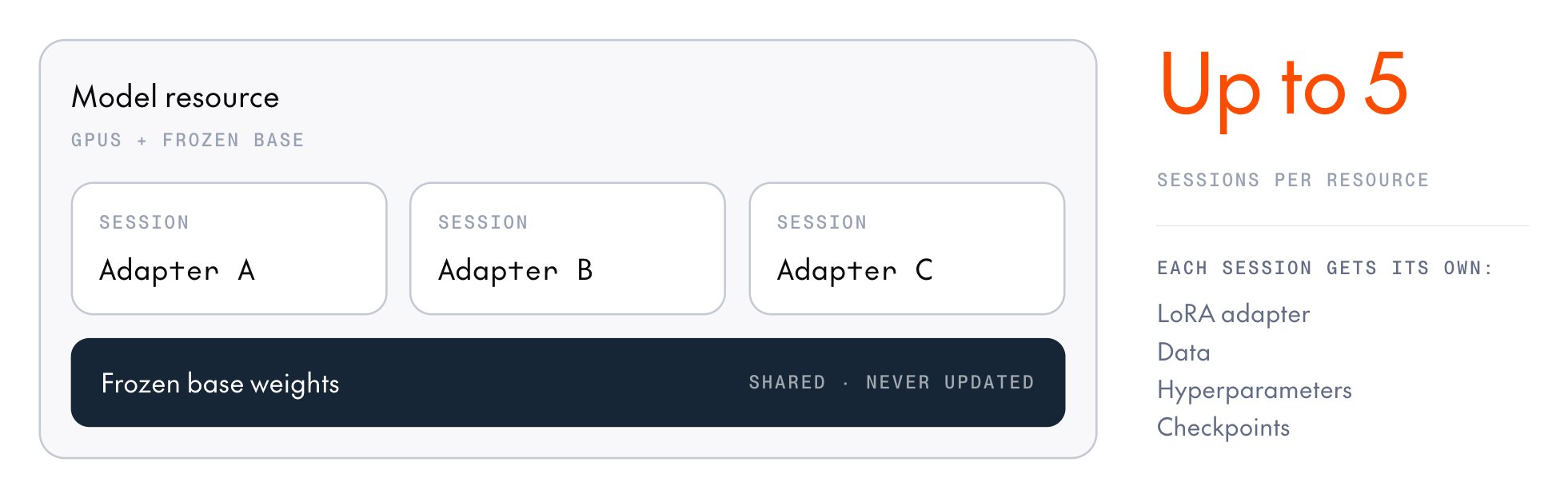
A model resource represents the set of GPUs allocated for training or sampling, plus the frozen base model loaded onto them. You choose its base model, training mode, GPU type, and number of generator replicas when you create the resource. You pay for it by the minute while it’s ready. A session is one set of trainable weights attached to a resource: a low-rank adapter (LoRA) or, on a full-weight resource, the full model weights. Along with those weights, it holds the optimizer state and a step counter. Every operation you call (sample, forward_backward, optim_step, weights_sync) targets a session.
LoRA is the default training mode. A full-weight resource hosts a single session, which updates every parameter. LoRA vs. full-weight training compares the two modes.
Stopping a session only detaches it from the resource, which keeps running and billing until you stop it. If none of its sessions runs an operation within its idle timeout (one hour by default), the resource stops on its own and its sessions expire. Lifecycle lists every state and timer for resources and sessions.
Trainer and generators
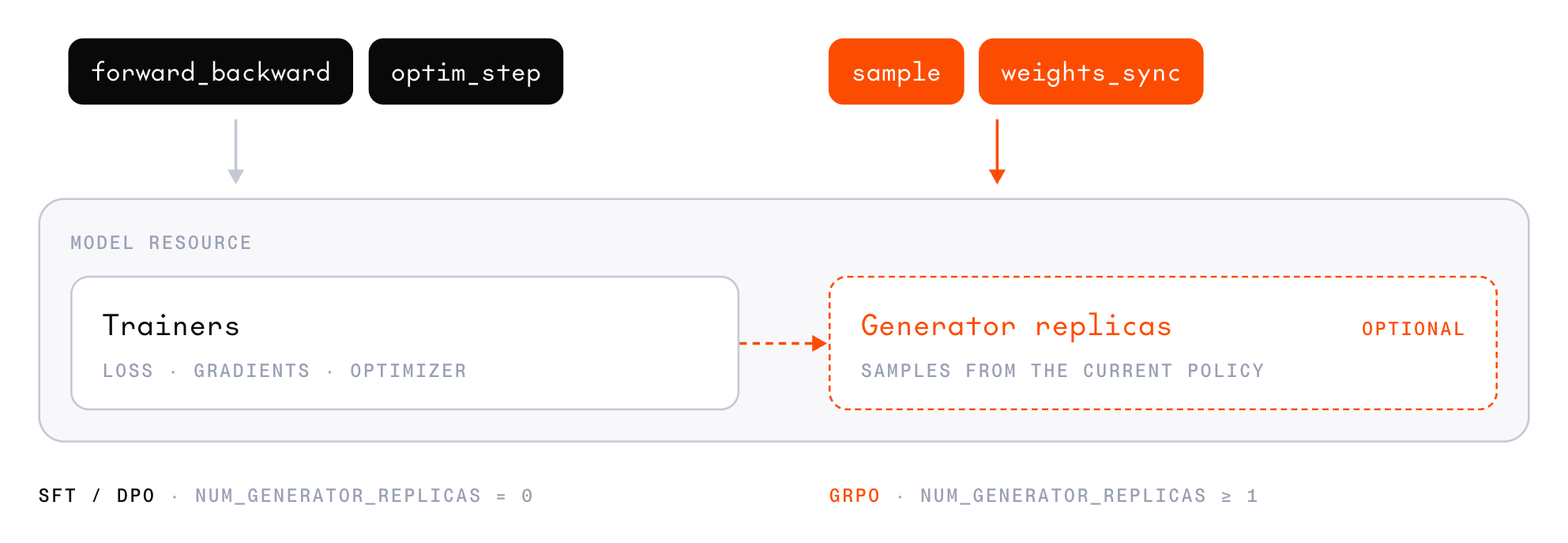
forward_backward, optim_step, and checkpoint save for every session on the resource. Each resource has at most one trainer, a single group of GPUs with the model sharded across them. It holds one copy of the frozen base weights and, on a LoRA resource, every session’s adapter and optimizer state alongside them.
A generator replica is a unit of sampling capacity that serves sample calls. It runs one or more inference engines, each with its own copy of the base model and each session’s adapter loaded, so one replica serves every session on the resource. Replicas are independent, so sampling throughput scales with the replica count. The catalog sets a replica’s size for each model and GPU type. Each replica adds to the resource’s hourly rate.
The two roles hold separate copies of the weights. The trainer’s copy changes on every optim_step. The generators’ copy stays the same until you call weights_sync, which publishes the trainer’s current weights to every replica, so the next sample comes from the updated model.
SFT and DPO run on trainer-only resources with no generator replicas and never call weights_sync. A sampling-only resource has generators but no trainer, and samples a saved inference checkpoint.
Sharing a resource
Data and samples
A sample is one training example. It pairs a token sequence with the per-token values that the loss function reads, such as which tokens to train on. Cookbook recipes build samples for you. When you write your own loop, you build each sample’s arrays yourself.Chat templates and thinking
Every conversation becomes tokens through the model’s chat template. These template behaviors decide whether a conversation trains as you expect:- Thinking defaults differ by model: Some templates think by default, and some always think. A template that thinks by default can render the prompt of a conversation without reasoning differently from the start of the full conversation, so the conversation doesn’t train. To train on data without reasoning, set
enable_thinkingto fit the model. - Reasoning belongs in
reasoning_content: Put assistant reasoning in that field, alongsidecontent, not in<think>tags insidecontent. Qwen3.8 27B’s template reads reasoning only fromreasoning_content. - Some templates strip earlier reasoning: When these templates render conversation history, they drop the
<think>blocks from earlier assistant turns. The rendered history then no longer matches the tokens the model produced for those turns, so the conversation can’t train as a single sequence. Split it into one sequence per turn instead, which trains each turn against the history the model sees at inference. The cookbook splits conversations for you. - Some templates end a turn with the next message’s role marker: When one assistant turn follows another, the first has no stop token, so merge or split consecutive assistant turns before training.
enable_thinking turns thinking on or off, and preserve_thinking sets whether earlier turns keep their reasoning.
Checkpoints
A session saves two kinds of checkpoint:- Inference checkpoint: Snapshots the model weights so you can download them. On most models, it also registers the adapter (for a LoRA session) or the full model (for a full-weight session) in your project’s model registry, so you can deploy it.
- Training checkpoint: Saves the full training state (adapter or full weights, optimizer moments, and step counter), so a later session can resume the run or start a new one from the same weights.
Deployment
After training, you can deploy an inference checkpoint to Together’s dedicated model inference platform. You can also download the weights and run them somewhere else, such as on your own GPUs or with another provider. The merged variant is a standard Hugging Face model directory with safetensors weights, the model config, and the tokenizer, so you can serve it with any inference framework that supports the base model.Next steps
SFT quickstart
Run your first supervised fine-tuning session from a cookbook recipe.
GRPO quickstart
Train a model on grade-school math with GRPO and an exact-match reward.
Post-training cookbook
Run ready-made training recipes, or reuse the cookbook’s helpers in your own loop.
Post-training SDK
Call post-training operations directly from your own Python code.
Manage model resources
Choose a configuration, then create, attach to, and stop a resource.
Manage checkpoints
Save, resume from, and download checkpoints.